
How to transcribe many files with the API
One file is a click; a hundred files are a program. The API takes the same files, returns the same transcript with the same segments and speakers, and is paid by the volume of the audio instead of a subscription.
The API is the same engine with a different door. It exists for the case where the files come in hundreds: a support team with a folder of recordings, a back office with a voice archive, an agent that has to read what was said. Nothing about the transcript changes — the same text, the same segments, the same speakers.
How to transcribe many files with the API
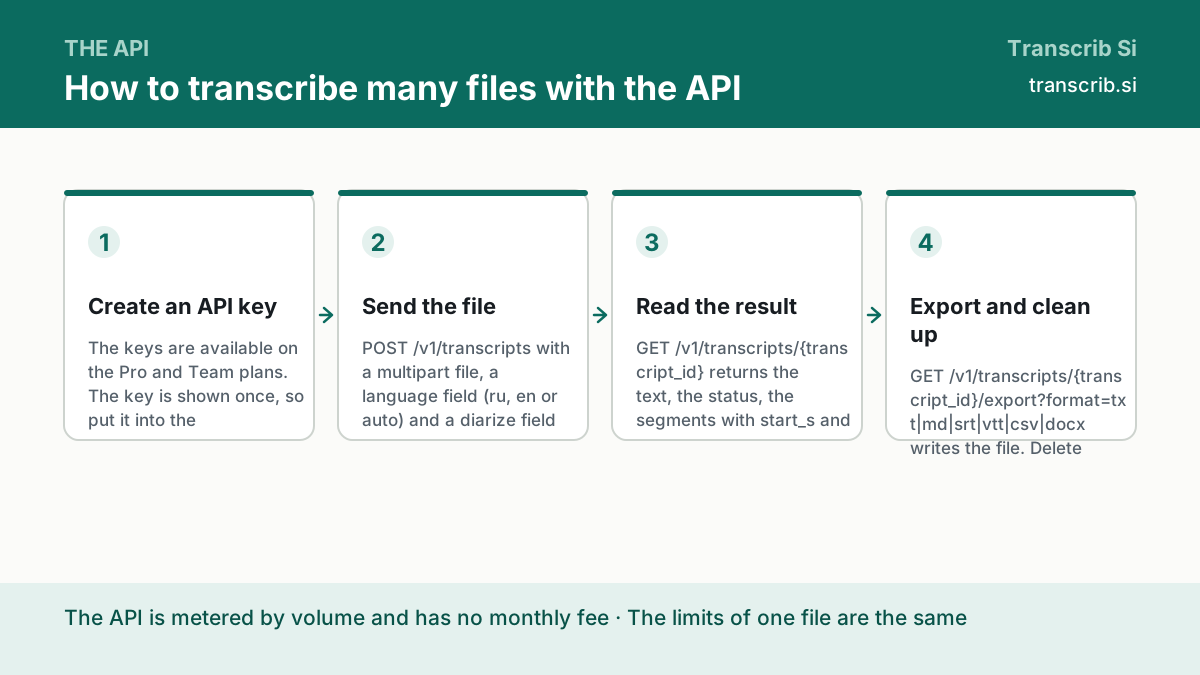
Create an API key
The keys are available on the Pro and Team plans. The key is shown once, so put it into the environment of the machine, not into the code: an API key in a repository is a key in the hands of everybody who reads it.
Send the file
POST /v1/transcripts with a multipart file, a language field (ru, en or auto) and a diarize field (true or false). A file of 8 MB or less goes in one request; a bigger file goes through the chunked upload.
Read the result
GET /v1/transcripts/{transcript_id} returns the text, the status, the segments with start_s and end_s, the speaker labels, the language and the duration. The same object as in the app, and the same thing to check before the transcript goes further.
Export and clean up
GET /v1/transcripts/{transcript_id}/export?format=txt|md|srt|vtt|csv|docx writes the file. Delete the transcript when the export is written, and read /v1/usage to see how much of the volume the month has taken.
The endpoints you need
The whole service is bigger than this, but a pipeline of files needs four endpoints and one header.
| Endpoint | What it does |
|---|---|
| POST /v1/api-keys | creates a key; the key is shown once |
| GET /v1/api-keys | the list of the keys, without their values |
| POST /v1/transcripts | uploads a file of 8 MB or less and starts the transcription |
| POST /v1/uploads/init, PUT /v1/uploads/{id}/chunk?index=N, POST /v1/uploads/{id}/complete | the chunked upload for a file of more than 8 MB |
| GET /v1/transcripts/{id} | the text, the status, the segments, the speakers, the language |
| GET /v1/transcripts/{id}/export?format=… | the file in the format you need |
| GET /v1/usage | the volume of the current month |
Files of more than 8 MB
A file of more than 8 MB is not sent in one request. The upload is opened, the file is sent in pieces, and the upload is closed. The size of one piece comes from the chunk_size in the answer of the first call, so the client does not have to guess it.
- POST /v1/uploads/init with the name, the size and the type of the file — the answer carries the upload id and the chunk_size;
- PUT /v1/uploads/{id}/chunk?index=N for every piece, with the raw bytes;
- POST /v1/uploads/{id}/complete — after it the transcription starts.
How the API is paid for
The API is metered by the volume of the audio and is billed separately from any subscription, with no monthly fee. The limits of one file are the same as in the app: 64 MB and 120 minutes, on every plan.
Transcribe one file in the browser first
The widget below is the same engine as the API. When the transcript of one file is right, the request that does the same thing in a loop is written in ten lines.
Drop an audio or video file
or — mp3, wav, m4a, mp4, up to 64 MB and two hours
Transcription runs without an account: sign in to keep the text, the history and the exports.
No account yet? The free plan needs no card. Create a free account or sign in.
Questions about the API
Do I need a subscription to use the API?
The API is metered by the volume of the audio and has no monthly fee of its own. The keys are available on the Pro and Team plans.
How do I keep the key safe?
Put it into the environment of the machine, not into the code and not into the repository. The key is shown once when it is created, and a key in a public repository is a key in the hands of everybody who reads it.
What happens when a request fails?
Every endpoint answers an error in one shape: {"error": {"code": "...", "message": "..."}}. Read the code, not the message: it is the same on every endpoint, and it is what a program should branch on.
Is the limit of one file different?
No. The API has the same per-file limits as the app: 64 MB and 120 minutes. A longer recording has to be split, and the guide on the file formats has the command.
Can an agent use it without a program?
Yes. The MCP server exposes four tools — transcribe_audio, summarize_transcript, extract_actions and list_transcripts — and the Claude and ChatGPT plugins use the same server.
The pages that go with this guide
Every endpoint, the header, the errors and the formats.
Four tools for an agent that works with the recordings.
The formats, the size and the limits of one file.
Mark Burmistrov, Founder.
The endpoints, the header, the error shape and the limits on this page are taken from the contract of the service and from its documentation. The author of the page and the publisher of the site are the same person.