
How to transcribe a call recording to text
The call is over and the recording is somewhere: a file on the computer of the host or a cloud recording in the account of the organizer. The text of the call is four steps away — take the file, upload it, read it with the timecodes, export it.
A call recording is the easiest and the hardest kind of audio: the voices are clear, but there are two of them, the file comes out of an app that wants you to log in, and a long call with the video on does not fit one file. This guide goes from the recording to the exported text.
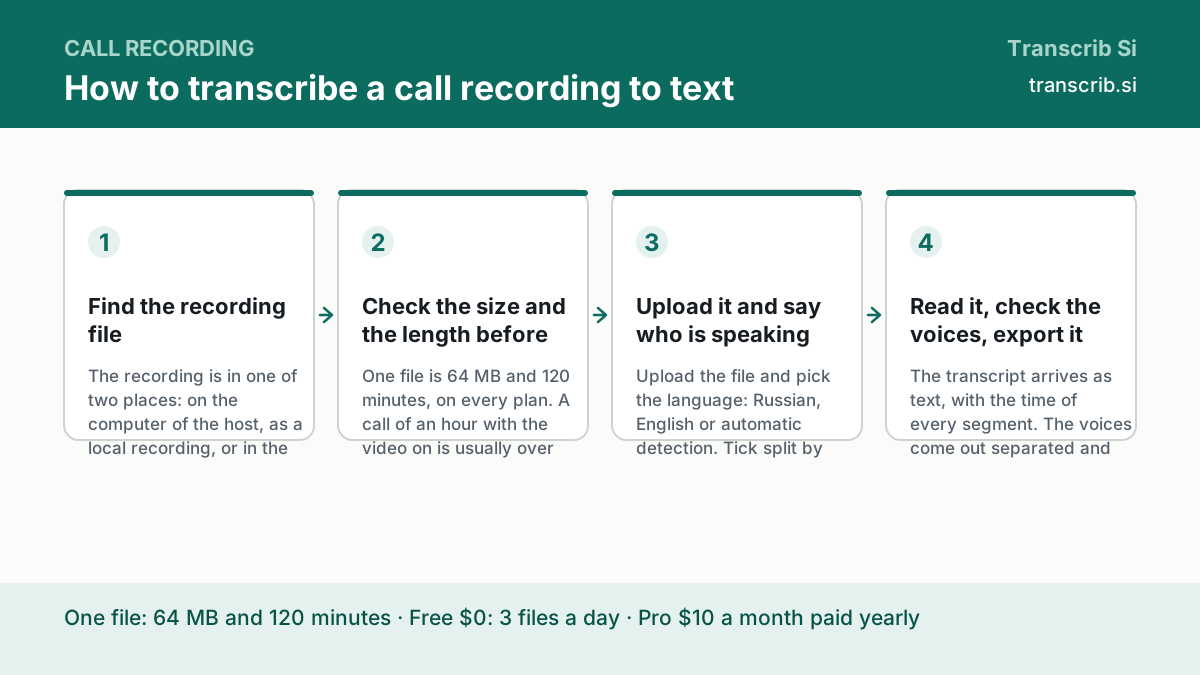
How to transcribe a recorded call
Find the recording file
The recording is in one of two places: on the computer of the host, as a local recording, or in the cloud of the call app. A local recording is usually an .mp4 with the video of the screens; the cloud one is downloaded from the app.
Check the size and the length before you upload
One file is 64 MB and 120 minutes, on every plan. A call of an hour with the video on is usually over the limit; the same call with the audio only is usually under it. If it does not fit, cut the video away — the command is in the guide on the file formats.
Upload it and say who is speaking
Upload the file and pick the language: Russian, English or automatic detection. Tick split by speaker, and the voices come separated and numbered. The audio is cut into fragments of 22 seconds with an overlap of 3 seconds, so a word on the border is not lost.
Read it, check the voices, export it
The transcript arrives as text, with the time of every segment. The voices come out separated and numbered: listen to the first seconds of each one to know who is who. Fix the names and numbers that matter, then export: txt, Markdown, SRT, VTT, CSV or, on Pro, DOCX. The label stays the engine's; the real name replaces it in the exported file, where the label sits in its own column.
Where the recording lives
The page of your own application is the exact guide for your case: it says where the file is and how to take it.
The local recording on the host's computer and the cloud one in the account.
Transcribe a Google Meet recording
Where the recording of a Meet call lives and how to get the file.
Transcribe a Microsoft Teams recording
The recording of a Teams meeting and its two places.
Transcribe a Bitrix24 call recording
A call in the CRM: where the file is and how to get it.
Transcribe a phone call recording
When the recording comes from a phone instead of a meeting room.
The size of a call recording, counted
A video call is written as a video: the picture takes most of the weight, and the sound is one track inside. The numbers below are counted from the bitrate of the audio track — a calculation, not a measurement of your file. Look at the real size in the properties before you upload it.
| Length of the call | 128 kbps | 256 kbps |
|---|---|---|
| 10 minutes | 9.6 MB | 19.2 MB |
| 30 minutes | 28.8 MB | 57.6 MB |
| 60 minutes | 57.6 MB | 115.2 MB, over the limit |
| 120 minutes | 115.2 MB, over the limit | 230.4 MB, over the limit |
What a month of calls costs
The Pro plan includes 1,500 minutes a month. The table counts how much of that allowance a month of calls takes; the rate of the plan is the published one.
| Calls in a month | Minutes | Of the 1,500 minutes |
|---|---|---|
| 20 calls of 45 minutes | 900 | 60% |
| 25 calls of 60 minutes | 1,500 | 100% |
| 30 calls of 60 minutes | 1,800 | 120% — over the allowance |
What happens to the file of the call
Russian and mixed speech is processed on our own infrastructure, outside the United States; a recording in English goes to a third-party provider in the US when the fallback is on. We never sell the audio and never train a model on it. On the Free plan the transcript is kept for seven days.
Upload the recording of the call
The widget below takes the same file you have. The text is on the screen as soon as it is ready; the file itself is not kept.
Drop an audio or video file
or — mp3, wav, m4a, mp4, up to 64 MB and two hours
Transcription runs without an account: sign in to keep the text, the history and the exports.
No account yet? The free plan needs no card. Create a free account or sign in.
Questions about the recordings of calls
Can I transcribe a call that is still running?
The file has to exist. We take files, not a live stream: stop the recording, take the file, upload it.
How many speakers can it separate?
Tick split by speaker, and the voices come out numbered. How many depends on the recording: two voices on one microphone are often heard as one.
Does the transcript keep the timecodes?
Yes. Every segment comes with its start and its end in seconds, and the export into SRT and VTT writes them as the cues of the subtitle file.
Is the recording of my call private?
Russian and mixed speech stays on our own infrastructure outside the US; an English file, with the fallback on, goes to a third-party provider in the US.
How much does it cost?
The Free plan is $0 and gives three files a day of up to 30 minutes each. Pro is $10 a month paid yearly, or $20 a month, with 1,500 minutes a month.
The pages that go with this guide
The hub: one guide for each task, with the tools that go with them.
The same way, when the call was a meeting with an agenda.
mp3, wav, m4a or mp4 — and what to do when the file does not fit.
Mark Burmistrov, Founder.
The limits here come from the service contract, the prices are the published ones, and the sizes are counted from the bitrate of the recording. The author of the page and the publisher of the site are the same person. Questions: support@transcrib.si.